Category : tips

tips

Why I changed one show from Libsyn to Soundcloud

In my last article, I compared Soundcloud and Libsyn as podcasting services. If you’re too lazy to check it out (I can be lazy too), then my basic conclusion was that both services are awesome for hosting a podcast, but Soundcloud is cheaper if you’re just starting out and testing out a new show or want an unlimited upload plan.

If you don’t know, I’m currently running two Podcast shows (one on crowdfunding and one on nonprofit fundraising). I decided to migrate my nonprofit fundraising show to Soundcloud for two reasons.

  1. To really experience how Soundcloud compares to Libsyn and see which I like more after an extended use case.
  2. Soundcloud is free up until 3 hours (sounds kind of cool, but is it?).

Upon further investigation, the free 3 hours deal means that you will only be able to upload a total of 3 hours and the $6/month deal means that you will only be able to upload a total of 6 hours.

“Pro subscription comes with 360 minutes (6 hours) in total. If you need more than 360 minutes, you will need to upgrade to a Pro Unlimited account, which has unlimited upload time.” – Source.
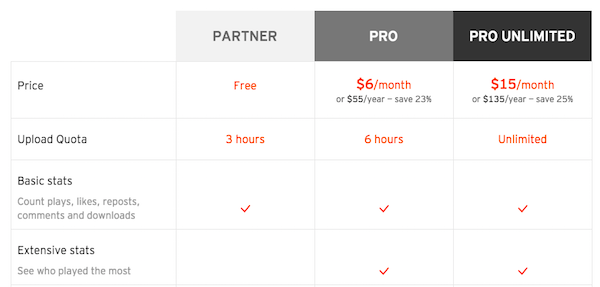
soundcloud pricing

Under Libsyn pricing, the fees are dependent on the amount you want to upload each month, not the total amount of storage that you’ve used up.

“Monthly Storage is the amount of new content you can upload each month. If you have the Libsyn Basic 250 plan you can upload 250MB of new content each month. The storage quota for each account is reset on the 1st of the month. Once your quota resets your files from the last month no longer count against quota.” – Source.
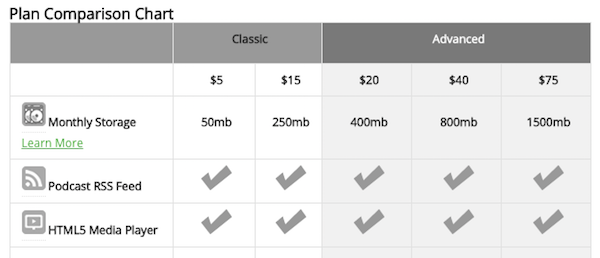
libsyn pricing

It’s a very interesting and important difference.

So why the switch?

Aside from wanting to try out Soundcloud, I haven’t been putting out the new show as regularly as I’d like and want to keep it housed on Soundcloud’s free plan for a little bit.

I think that for the $15 unlimited storage option, Soundcloud makes sense (Libsyn gives you 250 mb at their $15 option), but ironically I’m not transferring over the show that I do upload once per week, which makes me max out my storage on Libsyn each month.

I got to be honest, it was a pain to transfer the audio files from Libsyn to Soundcloud. It’s definitely not something I would want to do if I had 100 episodes. Then again, you could always outsource that task to a virtual assistant. You need to upload titles, descriptions, artwork, etc. You will also need to re-configure your RSS feed in your Libsyn dashboard to tell iTunes where the new RSS feed is.

If I had a very regular or long daily show, then I think Soundcloud would be a good choice. The only other reason I’d consider SoundCloud would be to try out a new show and see if you’re committed to it before doubling down on paid hosting. 

Concluding thoughts

Seeing as the $15 tier is the most popular for Libsyn, I think that Soundcloud is really pushing their pro unlimited option, which is a good deal, particularly if you start your show on their platform so that you don’t have to deal with migrating from another.

But, since my main show only comes out weekly and I’m fine with the 250 MB monthly for now, I’m going to stay with Libsyn for that show.

The one realization that I had from making this switch is that you need to choose your podcast host carefully. You don’t want to have to deal with switching to another provider when your dozens of episodes in. It’s a pain.
Read More
tips

How I got my first 7.5k podcast downloads

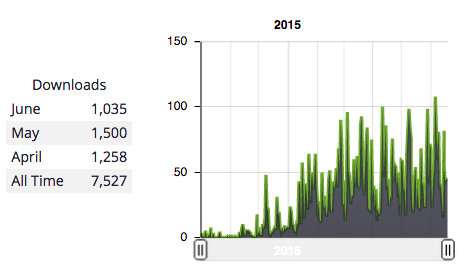
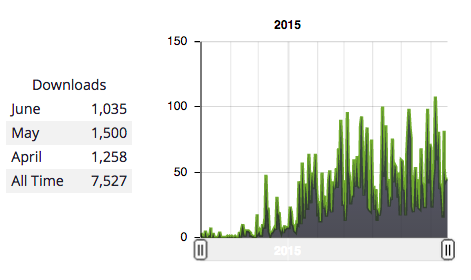
You’ve read it right! My podcast has been downloaded 7,500+ times (according to Libsyn) and the month isn’t over yet. Now, am I saying that to brag? No. Well, a little haha! Mainly, I’d just like to share some things I’ve learned thus far on my journey.

1. Pinpoint your goal.

Traffic, downloads, or pageviews for the sake of numbers that you can show off are meaningless! The real question that you need to answer is: What is your goal. Why are you podcasting?

Is it to make money from ads or products? To attract clients? Have fun? Get well known for a talent? Develop a relationship with your audience? Educate about a topic?

Typically, a podcast will fall into the entertainment, information/news, or learning/education category. My goal with my podcast is to:

  • Educate existing and new readers of my blog.
  • Develop a relationship with readers/listeners.
  • Have great content in audio form that I can reference.

Screen Shot 2015-06-19 at 3.26.42 PM

Although the podcast does have an advertiser (outlined how to get one here), my goal is not to make a bunch of money from advertising sales. It’s just to support some of the costs of the podcast.

Seeing as the traffic has grown and is relatively steady now, I’m beginning to meet the first two goals and with regards to the third, I now have 34 episodes of great content that I can direct individuals to who want to learn more about my blog’s niche in an audio format. I’ve referenced these through conversations, emails, blog posts, and more, which contributed to the growth of the podcast.

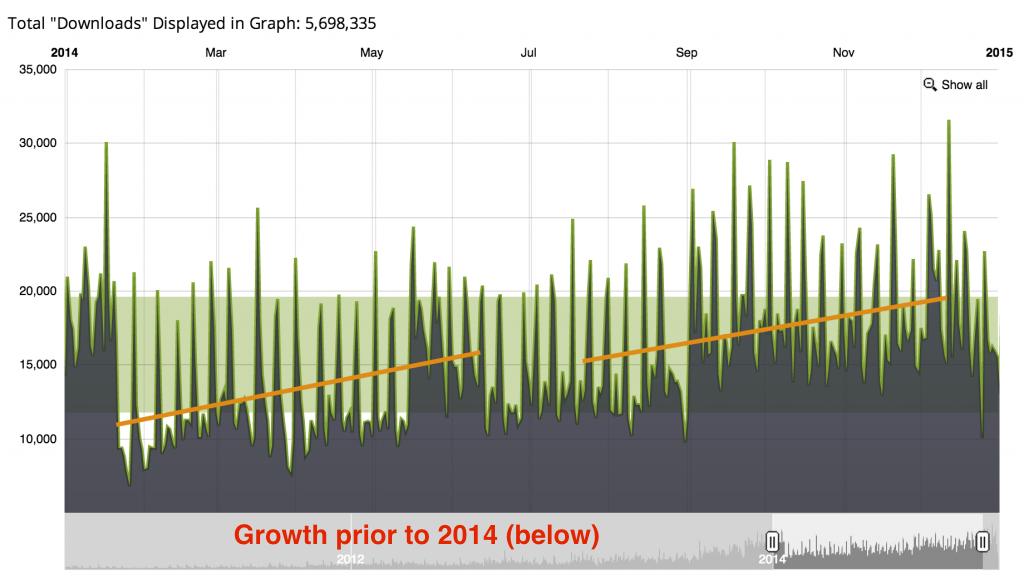
If my goal was to make a bunch of money from ads, I think that I would need a larger niche/audience. The Smart Passive Income Podcast gives you an idea of the kinds of numbers that you need to start making serious money. I’ve pasted their traffic chart below.

Screenshot-2015-01-26-20.51.22-1024x579 (1)

December Sponsorship Sales: $5,630.60

2014 Sponsorship Sales: $46,170.57

2014 Downloads: 5.7 million

From a pure download sense, it seems like hoping that your podcast will be big enough that you can live off the advertising revenue is kind of a long shot, but using that podcast as a way to develop a relationship with listeners so that they will be more comfortable buying products you genuinely recommend or your own products is more realistic.

Then again, I feel like the advertising on the Smart Passive Income podcast is an ancillary income stream and that he could be making more money if he stuffed the podcast with more ads, mainly because Entrepreneur on Fire is making $60k a month from sponsorship income with 850,000 monthly downloads.

2. Don’t rely on iTunes, Stitcher, or any marketplace

The big guys might get tons of new listeners from the iTunes marketplace because they are ranking so well in a competitive category, but if you have a niche or very specific podcast category, then the benefits of ranking well in iTunes for key terms that a listener might use to discover your podcast are slim.

I’m in the top 10 for several key terms that listeners might use to find my podcast, but I don’t think it’s very beneficial because the marketplace is too small. If I was to rank well in a larger general iTunes category, then I would definitely see some benefits, but I knew that just starting out, it would be unlikely that I’d have the audio or podcasting skills to do that.

Therefore, I knew that I would have to rely on my own website, social media feeds, and email list to drive traffic.

Rankings in iTunes or another marketplace are always changing and you don’t want to rely on one external source to connect with new listeners. I’d highly recommend setting up a website for your podcast with good content and an email-capture form so that you can begin to start building an audience on your own platform.

Tools to Build a Website:

Tools to Build an Email List:

Tools to Automate Social Media:

3. Combine positive emotions and useful content.

This point really depends on the type of podcast that you have. However, I’ve noticed that educational podcast episodes that come from more of an infotainment perspective tend to be received better than those that are simply pure entertainment or purely informational.

What do I mean by that? Rather than droning on or asking an interview guest dull questions, spice it up! Bring some emotion and personality to the experience.

I wrote about this more in this post regarding some of the mistakes I’ve made with my podcast, but here are a few ways that you can bring more personality to your podcast episodes:

  • Vary your tone and pitch
  • Memorize relevant engaging stories that you can tell
  • Joke about pop culture or common industry knowledge
  • Share a personal fact that relates to the podcast
  • Draw interesting analogies to make it easier to understand a topic
  • Sound excited and passionate!

I wouldn’t overdo it, but adding a bit of personality will make your podcast more interesting and the listener will come away feeling like they’ve gotten a lot of good informational content and that they’ve had a blast.

Don’t forget!

Tiny changes can make a huge difference in results. I don’t know how this podcast will progress over time, but I think it will be interesting to see how some of these changes I’ve begun to implement will affect future downloads. Let me know what your podcast is about in a comment below!

Read More
tips

How I Automated My Podcast

Initially, I was doing all of the editing for my podcast myself. However, I recently decided that, as much as I might think that I’m the only one who could do the job right, I’m probably just lying to myself out of the fear that someone else will mess up the editing for an episode.

I decided that if I just sat down and wrote out the step-by-step process that I use to remove background noise and take the podcast from raw audio to a finished product, then someone else would be able to follow those steps and I would save a lot of time in the future.

Thus far, I’m very pleased with the results of the virtual assistant that I used to automate the editing process. She also helps with other aspects of my business. It took a leap of faith, but I now trust her with the editing of my podcast!

If you’d like to also automate your podcast, here are a few steps that I’d recommend going through to pass on the editing to someone else and spend more time doing what you love – podcasting.

automate podcast

1) Write out the editing actions you take step-by-step

stepsHave you ever programmed a computer? Think of writing out the steps almost like writing out an algorithm or directions for a computer to follow.

While I was editing a new podcast, I wrote down every single step that I took in detail, as if I was explaining it to someone over the phone who was looking at my computer screen.

I first identified the elements to the podcast that would remain the same (like the intro/conclusion) and specified how to arrange the sequence of audio.

I then identified portions of audio, like the podcast sponsorship, which might vary from episode to episode and included instructions, like “Check the dropbox folder for a sponsorship audio file. If there is one, insert the audio after the introduction and before the start of the podcast. If there is not one, then you can skip this step.”

After I had finished, I had a document that was easy to follow and explained how I edited my podcasts.

2) Write out FAQs for the editing process

I very clearly specified that, should the editor have any questions, then they should stop the editing process and ask me before proceeding. This may have made the initial editing slow, but it gave me the chance to generate a series of FAQ (frequently asked questions) and address them in a document for future reference .

Anticipating some of the questions that might come up also will speed up the process and make it more likely that you will receive a perfectly edited podcast. For example, I knew that there would sometimes be awkward pauses or portions that need to be edited out when recording a podcast. I included instructions like:

  • If there is a pause in the audio that exceeds __ seconds, then edit it out.
  • If I ever state on the podcast “I’m going to edit that out,” then edit out the audio portion that I specified I would edit out.
  • There should be no less than __ seconds between the intro and podcast body and no more than __ seconds.

This may seem overly specific, but keep in mind that you’ll only have to create this document once and it will be invaluable to the person editing your podcast, should they have questions.

3) Hire someone with editing experience.

If you’re on a budget like I am, you’ll probably have to hire a low-cost editor from Elance, meaning that their english may not be perfect. If you have a comfortable budget, I’d recommend oDesk.

Personally, I prefer ongoing relationships rather than one-time transactions. My virtual assistant who helps with other business tasks has some editing experience and I was willing to give them the chance to try taking on the editing process. Although they had to learn a bit, they can now edit it perfectly to my specifications.

Should you decide to hire someone off a freelancing website, make sure you ask them which editing program they use, how they will reduce noise, and get a feel for their english speaking/understanding competence.

If you’d like to use my virtual assistant for the task, feel free to contact me or leave a comment below and I’ll get in touch.

4) Expect them to get it wrong the first few times.

One of the common fears that I think everyone with a podcast has when considering automating the editing process is that the person will get it wrong. That’s okay!

I knew that it wouldn’t be perfect to my specifications the first time that my virtual assistant tried to take over the editing workflow. There would be kinks in the system I set up, and they would have questions. This is normal.

However, by dealing with these problems as they come up, you’ll be ensuring future peace of mind and more freed up time when that individual is able to successfully take over the editing process.

The important thing is to avoid assigning them a bulk number of podcasts the first time that you retain their services. First, let them get the editing process down for one podcast. Then, you can give them multiple podcasts to edit that will go out at future dates. If you don’t perfect the system for one podcast episode first, you may end up with editing mistakes in all of the podcast that you’ve assigned them.

5) Use a simple file upload and management process.

I just use a shared dropbox folder. After recording the podcast episode, the intro, and the outro, I upload the media files to a folder that says “Podcasts to Edit” and a subfolder that says “Episode X ____.”

There is another folder that says “Podcasts That Have Been Edited.” Upon completion of the editing process, the virtual assistant will move the particular podcast episode folder, which includes the finished audio file and the originals, into the “Podcasts That Have Been Edited” folder for me to review. That’s it!

I could easily ask the editor to also schedule each podcast to go out on a certain date through the Libsyn scheduler (date the folder or include a text document with instructions), but I’m happy with the process right now.

The great thing about this process is that I can now focus on lining up podcast guests and conducting interviews, rather than worrying about podcasts that need to be edited. I know that some people love editing. I’m not one of those people.

Read More
tips

Libsyn vs Blubrry

Libsyn and Blubrry are two popular podcast hosting services among others. In this article, I’ll compare some of the similarities and differences between the two, and help answer which you should choose if you’re launching a new podcast.

If you have any questions, be sure to leave a comment on this article! I’d also love to hear which podcast hosting service is your favorite.

Libsyn

libsyn

Libsyn is one of the longest running hosting providers out there. The company was started in 2004 and hosts many large podcasts, like The Tim Ferriss Show.

Although the user interface is a little outdated, it’s very easy to set up a podcast and generate an RSS link for the iTunes store. You can also pre-schedule podcasts and customize all of the basic information for the iTunes store like the description of your podcast, the title, and sub-title.

The pricing for Libsyn starts at $5/month and goes upwards of $75/month. At the $20/month tier you will gain access to advanced statistics, like where people are listening to your podcasts from and on what devices.

On the pro side, Libsyn is dependable and has a long history of hosting podcasts. On the con side, the user interface and podcast player is a little outdated.

Blubrry

blubrry

Blubrry was founded in 2006 and is a “podcast community and directory that provides media statistics, hosting, and the PowerPress podcasting WordPress plugin.”

In contrast to Libsyn, Blubrry has a flat $5/month add-on for podcasting statistics. Hosting starts at $12/month and goes upwards of $80/month. Blubrry also offers podcast consulting and web development services ranging from $100-$150/hr.

I think that one of the major selling points of the Blubrry podcast hosting services is the PowerPress podcasting plugin, which makes it easy to embed a media player onto your website or blog. You can also “sasily add, modify and remove podcasts from blog posts and pages.”

Which should you choose?

I personally have had no difficulties using Libsyn, though I do wish they would upgrade their user interface and podcast player (this con is making me consider switching to SoundCloud, with better pricing and a more modern podcast player/ecosystem).

Although I have not used Blubrry, it has been spoken highly of on School of Podcasting for it’s ease of use with wordpress. “Blubrry is slightly easier to use as everything is done within WordPress (for the record this does not mean Libsyn is ‘hard’ it requires you to copy and paste some info), but its more expensive.”

Ultimately, the choice comes down to your budget, your preferred user interface, and which company you’d like to work with in the coming years.

Read More
tips

SoundCloud vs. Libsyn

In case you haven’t heard, SoundCloud recently announced that it’s opened up its podcasting features to all users. Previously, you had to request an invite in order to use SoundCloud as the hosting provider for your podcast.

What does this mean? With 175 million+ monthly listeners and 15,000+ podcasters are now using SoundCloud! This platform has arisen as a serious contender to the well-known and popular podcasting hosting service, Libsyn.

But, what are the differences between Soundcloud and Libsyn? Which should you use? I’ll answer a few of those questions below from my own research and experience.

SoundCloud

soundcloud screenshot

SoundCloud has been around since 2007, but up until this time, the company has primarily focused on the mainstream audio listening audience. Recently, that auidence has grown to include the podcasting segment

The Podcast Player

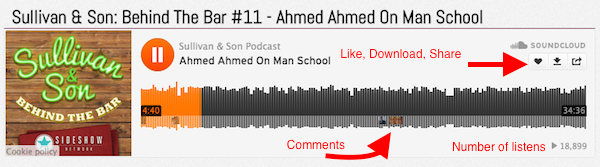
Like Libsyn, SoundCloud offers an embeddable player, however, unlike Libsyn, this player allows users to comment on specific portions of the song. In addition, the player has social share options, so that listeners can easily share episodes to their social network, and the option to “like” or “download” a track. You can also follow a user on their SoundCloud page or go to their page to leave a comment on a track.

soundcloud player example

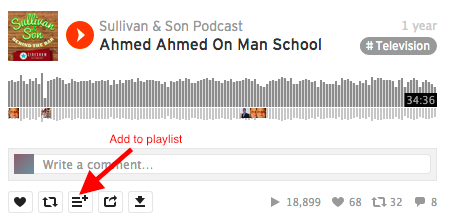
The SoundCloud player also allows users to easily embed specific tracks from a user’s profile online, re-post it, add it to a playlist, or see how many plays a particular track has.

soundcloud player example2

The Stats and Analytics

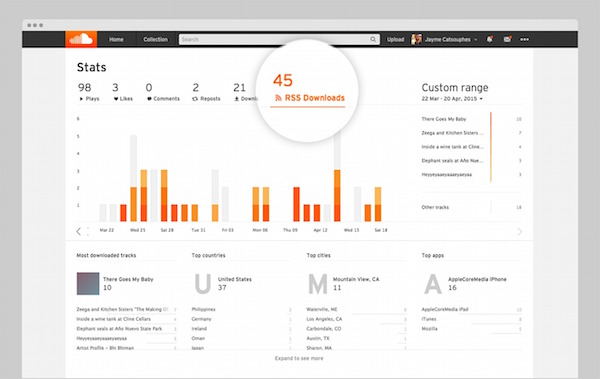
SoundCloud’s stats and analytics include the ability to see where your fans have listened to your podcast (player, mobile app, etc), the number of file downloads, the number of RSS downloads, and the top countries for those downloads. Finally, Pro users can hide the information displayed on most public players like comments, plays, reposts, and likes.

soundcloud stats

Pricing

  • Free Plan (3 hours of upload time)
  • Pro Plan (6 hours of upload time): $6/month.
  • Pro Unlimited (unlimited hours): $15/month.

You can find the pricing list here.

Libsyn

libsyn screenshot

The podcast hosting website Libysn was started in 2004 and has been one of the top hosting choices up until this point for podcasters. The website hosts over 10,000 podcasts and has 18 million+ audience members in their network.

The Podcast Player

The Libsyn Podcast Player comes with three templates and primarily allows listeners to play the podcast, pause it, or change the volume, as I’ve shown below.

libsyn player example

It also allows podcasters to set the player to “play upon loading,” customize the width/height, and whether or not a thumbnail should be included. Podcasters can also grab a download url or link to a page that contains their playable podcast episode or the “blog” that Libsyn creates for each podcast, which I’ve shown below.

libsyn example blog

libsyn blog example

The Stats and Analytics

Since, I’m only on the $15/month plan I only have access to basic statistics, like the total number of downloads and the downloads per episode, but the $20/month plan will give advanced stats regarding geographic data, and the types of technology used (Chrome/Firefox/iTunes) to download the podcast.

libsyn stats

You can see some screenshots of their advanced statistics here.

Pricing

  • Classic Plan – 50 mb: $5
  • Classic Plan – 250mb: $15
  • Advanced (400 mb to 1,500 mb): $40-$75

For me, a 30 minute podcast is about 45 mb, though I’m still learning how to best format audio. You can find the pricing here.

Conclusion

After doing this comparison, it almost seems like a no-brainer that Libsyn is going to need to make some major changes to keep up with SoundCloud’s functionality, community, and pricing. The Libsyn player/UI is outdated. Also, for $15 a month I could get unlimited storage on SoundCloud.

The one leg up that I think Libsyn has over SoundCloud is that Libsyn has been around longer and has established a reputation of being a dependable provider. However, SoundCloud has been hosting audio files for a long time, just not podcasting files.

Although I currently host my podcast with Libsyn, I’m now thinking about switching to SoundCloud. Where do you host your podcast? What do you think of the debate between SoundCloud vs. Libsyn?

Read More
tips

5 Beginner Podcasting Mistakes To Avoid

You might have just launched an entertainment podcast or a “how to” podcast that teaches your audience how to master a certain skill, like online business. Either way, there are a few common mistakes that I’ve come into contact with both on my own podcast and from networking with other podcasters.

Before checking out some of the beginner mistakes below, leave a comment on this article and let me know what podcast you’re working to grow! Don’t forget to link to your own podcast!

1. Failing to have an accompanying blog/website

wordpress websiteWhether you are getting most of your traffic from SoundCloud, Stitcher, or the iTunes marketplace, the only way to form a longterm relationship with your podcast listeners is to have your own website where they can connect with you, your email list, and your various social media profiles.

In addition, having your own website means that you can install google analytics and get in-depth information about your visitors including how long they spend on your website and what region of the planet they’re coming from.

I recommend setting up a wordpress-based blog and choosing a free premium-looking theme or purchasing one. Just be sure that the domain name for your podcast isn’t taken, or you might lose visitor traffic or listeners might get confused when they type the name of your podcast into google and some other website comes up.

2. Not capturing listener contact information.

You might find yourself trending in the “new and noteworthy” section on iTunes or see a surge of downloads from being a guest on another podcast, like we talked about in this article, but the only way to capture that momentum is if you capture the email or contact information of your listeners!

This goes back to point #1 – get a website! I’d then set up an email newsletter using Mailchimp or another software tool (like these) and create an opt-in form so that visitors can easily enter their email address to join your mailing list.

Once they’ve opted in to your mailing list or, if you are fancy, an auto-responder sequence, then you can send them emails about new podcast episodes, upcoming news, or products that you’ve created.

This way, you can capitalize on any traffic spikes that you might generate through social networks like Facebook or from doing marketing or PR outreach.

3. Ignoring the law of supply and demand.

Just as there is a supply and demand for hard goods in the real world, there is a supply and demand for information in podcasting marketplaces like iTunes or in the actual target market.

What do I mean by that? Well, the number of people interested in horror movies is likely smaller than the number of people interested in comedies or romantic comedies (making this up). That doesn’t mean that you can’t build an audience out of horror movie lovers, as they may be more enthusiastic than the latter movie-lover, but these numbers will dictate the size of your overall market and the potential size of your audience.

Picking a “niche” topic or subject will make it easier to connect with a core group of listeners, but it will also make it harder to grow a big show if your niche is too narrow. Think about how much supply is out there and the demand for both the type of content medium you will be producing (podcasts) and the quality/essence of the content.

4. Forgetting to humanize your show.

There is definitely a move towards polished and professional-grade podcasts, but don’t forget that even more than a great quality audio experience, listeners want to connect with real human beings who might have jokes, humorous banter, emotionally compelling monologues, or interesting stories.

It’s hard to put yourself out there. Believe me, I know and am still working on it. However, inviting people into your life, even if it’s just by sharing a small quirky fact about yourself like on the SmartPassiveIncome podcast or throughout the show like the Tim Ferriss podcast can be a great way to begin to form a relationship with your listeners.

5. Dismissing marketing and promotion.

Finally, no one is going to toot your own horn for you. You have to get out there and form relationships with influencers or shout news from the roof tops.

There is this bias towards a “build it and they will come” mentality among content creators, myself included, which is just wrong. Yes, we put so much time, energy, and effort into creating great podcast content, but just because we know it’s awesome doesn’t mean that other people do!

I think that as more and more podcasters get into the niche, many will be disappointed when they don’t see immediate results or when they find that they are trending one week in iTunes and forgotten about in the algorithm the next week.

You have to be willing to promote your own podcast content, whether that’s on other people’s podcasts, through social media, or on your website.

Read More
tips

Top 11 Podcasting 101 Resources

In this article, I’ve compiled a few different resources that you can take advantage of when you’re launching and growing your new podcast. These are awesome experts, bloggers, and individuals who have been-there done-that.

Don’t forget to leave a comment on this article letting us know what your biggest question or problem is with your podcast.

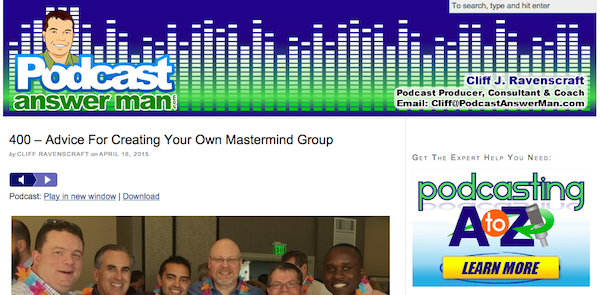
1. Podcast Answer Man

podcast answer man

Podcast Answer Man was started by Cliff J. Ravenscraft, an enthusiast about the podcasting medium and a podcaster himself who has produced more than 2,800 individual episodes of more than 20 different shows.

Ravenscraft shares what it takes to launch a successful podcast “from A to Z” and also has been transparent regarding the income that he is making from podcasting.

“My goal is to help you create valuable and engaging podcasts that are so compelling that people will want to engage with you and your brand.” – Source.

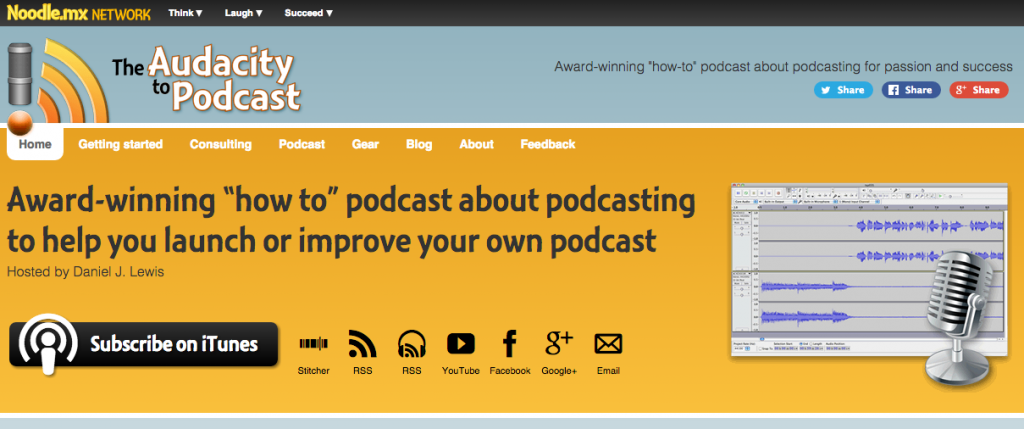
2. The Audacity to Podcast

the audacity to podcast

The Audacity to Podcast was founded by Daniel J. Lewis and is another podcast about podcasting that shares tips, bits of advice, and how-to articles on the podcasting medium.

Lewis has launched a number of podcasts himself, which he’s branded as the Noodle.Mx network, including a comedy show, science fiction show, christian show, and more.

“I have a passion for creativity! I’ve been podcasting since 2007, which is when I launched my clean-comedy podcast.” – Source.

3. School of Podcasting

school of podcasting

The School of Podcasting was started by Dave Jackson with the goal of being a podcast about podcasting and ranking more highly in iTunes.

Like the Ravenscraft, Lewis has also been transparent with his the earnings from his website/podcast here.

“I’ve been podcasting since April of 2005. My podcast about podcasting has been downloaded over 1 million times (as of 2014).” – Source.

4. Podcast About Podcasting

podcast about podcasting

Created by Mike & Izabela, this website “reveals all of the tips and tricks you need if you’re getting started as a podcaster, radio host or DJ.” The accom

The blog and accompanying “Music Radio Creative Podcast” explains how to improve your audio quality and overall audio production.

“Join the Music Radio Creative community and find out how to sound good today.”

5. Podcast411

podcast411

Podcast411 is another website that you can use to learn to set up your own podcast. Don’t be fooled by the simple design! The founder of this website, Rob Walch, also wrote the book Tricks of the Podcasting Masters.

“It is for anyone looking to distribute an audio podcast, but does not have a lot of money to do so.  This tutorial is perfect for students, educators, churches and those with little to no technical experience.”

6. The Podcaster’s Studio

the podcasters studio

The Podcaster’s Studio was founded by Ray Ortega who also runs Podcast Quick Tips. The shows talk about how to edit, publish, and promote your podcast.

“I bring the experience of a full-time podcaster, schooled in all aspects of podcasting and I enjoy sharing that knowledge via this website.”

7. How to Record Podcasts

how to record podcasts jeffrey powers

On this website, Jeffrey Powers shares tips on how to launch an audio or video podcast and set up RSS feeds and plan your website. He also runs the the how to record podcasts google+ group, which we linked to here.

“How to Record Podcasts gives you a full library of products, tips and tricks in podcasting.”

8. Podcasting Tools

podcasting tools

Although an older website, Podcasting Tools has a lot of great how-to tutorial articles for beginner podcasters.

“Online business owners should think of podcasting as yet another avenue for promoting your products and services. Like an ezine or the RSS feeds you already use, it’s a simple inexpensive method of syndicating your audio files online”

Noteworthy Guides

9. How to Start a Podcast

smart passive income podcast tutorial

This guide, created by Pat Flynn on the Smart Passive Income blog includes both text and video tutorials as to how to set up a podcast.

“The podcast has enabled me to build a stronger relationship with my audience – much stronger than I could ever do with just my blog alone.”

10. Podcasting for Beginners

buffer podcasting for beginners

This article was put together by Kevan Lee at Buffer. I really love Buffer as a social media scheduling tool and they also have an awesome blog. This guide is no different! It dives straight into what you need to know to set up your own podcast.

11. The Most Comprehensive Podcast Tutorial Ever

my wife quit her job podcast tutorial

Well, I don’t know if the article stands up to the big title, but it’s definitely a helpful tutorial! Steve Chou is the founder of this website and the My Wife Quit Her Job podcast, which focuses on ecommerce entrepreneurs.

“Using the techniques described in this course, I launched my podcast and hit the #1 podcast in all of iTunes in the Business and Marketing category within 4 hours”.

What is your biggest question about launching a new podcast?

Read More
tips

Podcasting with The Blue Yeti Microphone

I’ve been using the Blue Yeti USB microphone as my first podcasting microphone and after having used it for several months, I have a few bits of wisdom to pass on.

Before we jump in to these tips, if you’d like to hear the difference between a podcast I recorded with and without the Blue Yeti, you can first listen to this one (with the microphone) and then this one (my mac’s built-in microphone). Keep in mind that I’m still working on beefing up my audio editing skills, so this also is responsible for some of the differences.

1) There sometimes is a noticeable hum when recording

After I plugged the microphone into my laptop’s USB port and recorded my first podcast, I noticed this distinct hum during silences throughout the recording. I did some research and came to the conclusion that the hum was caused by my computer and the need for a powered usb cable.

Although I haven’t yet bought a powered usb cord, I managed to pretty much eliminate the sound with Audacity using this technique.

2) Don’t use the mute button on the mic

I’ve made the mistake when recording a podcast with a guest to hit the “mute” button on the microphone and for whatever reason, I didn’t click it hard enough to turn off the sound on my end and there was this awkward plastic button noise when I replayed back the recording.

Rather than muting your end of a recording with the mute button on the mic, I recommend sticking to using the software button on Skype to accomplish that.

3) Experiment before recording

I’m one of those people that like to ready fire aim when it comes to producing content. When I was recording a youtube video, I could hear myself fine in the mic playback, but throughout the video I sometimes changed the position of my chair a little bit and moved backwards and forewords towards and away from the camera.

Obviously, this movement changed the sound recording quality throughout the video. If you’re going to record a long podcast or youtube video, it’s best to try to maintain in the same position throughout the recording or to experiment ahead of time to make sure that the microphone picks up all of the sounds.

4) Understanding all the knobs.

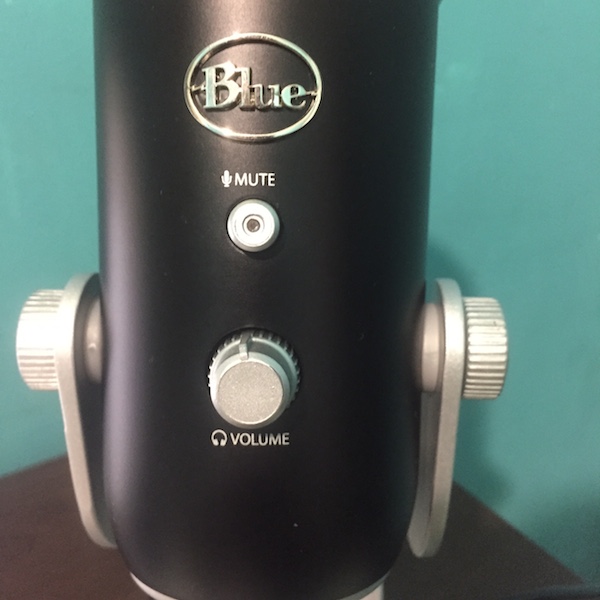
The first image below is of the front of the Blue Yeti. As you can see, there is the mute button, which I referenced earlier, and a headphone volume knob. The volume knob will control the sound that comes out of the microphone to your headphones, which you might be using to monitor how you sound.

Blue Yeti Two

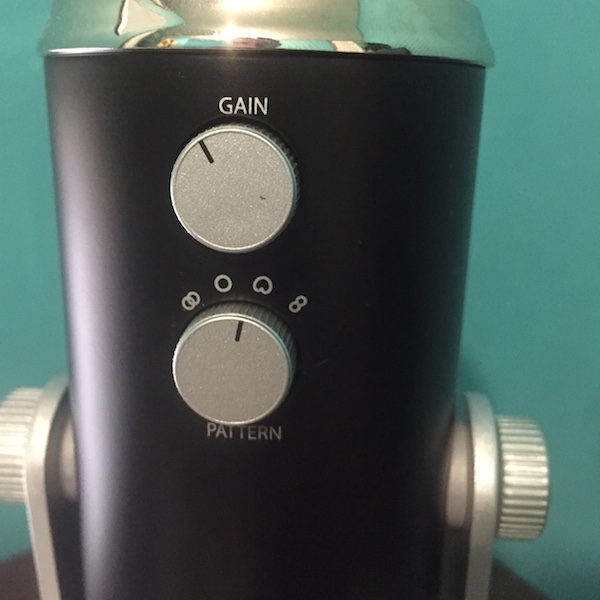
The second image is of the back of the Blue Yeti. The back contains the gain knob and the pattern knob. The gain knob controls the sensitivity of the microphone and how it will pick up noises in the surrounding environment.

Blue Yeti one

“When recording in USB mode, begin recording with this knob centered. If you are experiencing digital distortion with a very loud sound source, simply decrease the gain counterclockwise. If you desire higher sensitivity, simply increase the gain by turning clockwise.

When recording using the analog outputs, we recommend the microphone gain on the Yeti Pro to be turned to zero, or all the way counterclockwise. If more gain is desired you can rotate the knob clockwise to increase the microphone’s 4 sensitivity. However, in analog mode, Blue recommends making gain adjustments in your preamplifier or interface equipment to minimize the chance of distortion.” – Source

The patter knob also controls how the microphone picks up sound, but in a different way. The various icons show whether sound will be taken in from the front and sides (vocals/instruments), all around (conference calls/events/field recordings), from the front only (podcasts/voiceover/vocals), or from the front and the back (interviews/instruments).

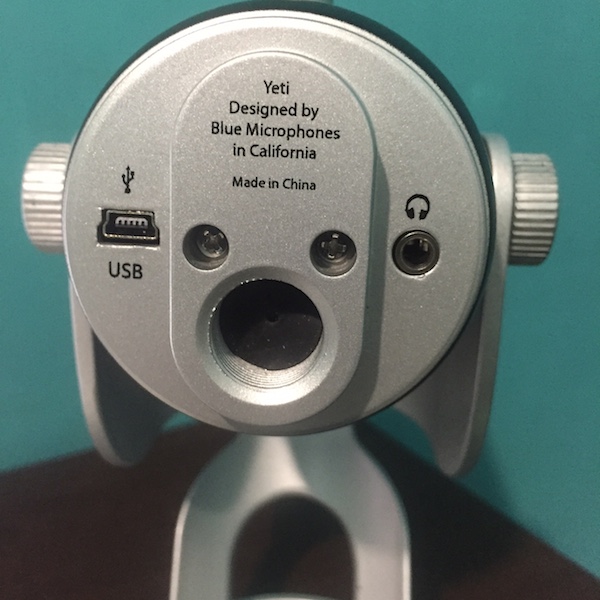
Finally, the bottom of the Blue Yetti contains the USB port and the headphone jack. Like most podcasters, a usb microphone was a must for me because I knew I’d be using it for online interviews and recordings.

Blue Yeti three

Would I buy it again?

I am in no way a technical expert when it comes to microphones. Thus far, I’ve had a pretty good experience with the Blue Yeti and the built in gain and pattern knobs have helped my understanding of recording in general. I’m still working on producing the best sound quality, but I think that this comes with time and trial and error.

The only other microphone I was considering buying was the Blue Snowball USB Microphone, which is about half of the Blue Yeti in price. One thing I did that made the choice much easier was spend an hour watching youtube videos of different people demoing the various microphones and providing their thoughts. Thank you, internet.

I’m curious – what microphone do you use? Let me know in a comment below!

Read More
tips

How to interview podcast guests via Skype

If you’re like me and can’t afford to fly around the world to conduct podcast interviews, then you have a few different options to interview guests. You could record a conference call via phone, do a recorded google plus hangout and extract the audio, or have a Skype conversation.

Of all of the methods that I’ve tried, Skype has been the simplest and most reliable, though I say that lightly. It’s true that almost everyone has a Skype account, but  everyone is also familiar with some of the common snags that come with talking on Skype, which might include background noise, wifi interruptions, and delays in voice delivery.

skypeIn total, I think the positives outweigh the negatives, particularly for a beginner. Skype is the best cheap alternative that I’ve come across for conducting podcast interviews. Of course, an in-person interview would be best, but we can’t all do that! If you have a good alternative to Skype that you use, please leave a comment on this blog post! Otherwise, we can get straight to some of the things I’ve learned from conducting podcast interviews throughout the past few months.

1) Download a call recorder to record your calls.

The first thing that you need to do if you’d like to use Skype to create podcast interviews is to download a recording software (see a list here). Since I own a mac, I use the eCamm Call Recorder, which works great and was well worth the relatively low cost investment.

2) Upload a professional logo and create a username

If you haven’t already, it’s a good idea to upload a professional logo or photo to your Skype account, particularly if you are trying to make a good impression on your guests. I would also change that possibly embarrassing username you choose a while back and pick out one that is more professional sounding.

3) Notify your guest you will be recording via Skype

I’ve made the mistake before where I’ve forgotten to specify that the interview would be conducted on Skype rather than on the phone! It takes time to download a new piece of software and create a username. Don’t forget to tell your guest ahead of time that you will be using Skype as the interview medium. Also, remember to take into account your timezone and how that may differ from you guest’s timezone.

4) Don’t start recording right away.

Early on, I wish that I had taken more time to warm up the interviewee and get to know them before hitting that record button. Frankly, I was just nervous to get on with the interview. However, I noticed that if I took more time to banter initially with the guest, then I could clear the air with any questions that they may have about the recording process and also just give them a heads up about where I planned to go with the interview.

When you are ready to record, remember that you can later edit out any awkward pauses or stutters. This reminder will ease a bit of your own tension, which can come from trying to cover a bunch of material in the time allotted. I’ve also found that it’s best to start the podcast in a positive and welcoming tone. Joking a little bit with the guest is one way to set their mind at ease and help them forget that every word they are saying is being recorded.

5) Focus on the guest, not on the interview.

Finally, the key to conducting a successful interview is to focus on the person you are interviewing! I am still struggling with this mindset, because I’m constantly thinking about what question I want to ask them next, how the last segment sounded, and whether or not we’re hitting the points we need to in a given interview.

The more that I become comfortable with the pausing before speaking, the occasional silence, tangents I didn’t expect, and cutting out “ums” and “likes,” the more I am able to stop focusing on the path of the interview or how it’s being conducted and to start puting more attention on the actual person I am interviewing.

Over-planning and having too rigid of a question structure has definitely been a hinderance to recording awesome interviews. I think this could also be said of the acting profession or being on video in general – you must be in the moment to genuinely feel emotions, react to statements, and form a connection that will make the other person and you intriguing to listen to.

These have been my experiences, but I’d love to hear what your experience has been like interviewing guests in a comment below! For further reading, check out how I’ve gotten guests in the past for my podcast.

Read More
tips

Top 5 Podcast Hosting Websites

If you’d like to submit a podcast to the iTunes store, or any other marketplace like Stitcher, then you’re going to need to either host your own podcasts or purchase hosting with an online provider. I recommend the latter route for those just starting out. Check out some of the options below!

1) Libsyn

Libsyn screenshot

Libsyn is the hosting provider that I use for my podcast. So far, I’ve never run into issues with them as a provider and they’ve been around a long time. They also have a well established track record, having hosted several major shows.

Their pricing ranges from $5 – $75 per month. If you’re going to be posting a podcast once a week and average 30 minutes to 1 hour per show, I think the $15/month tier is fine. The upper tiers include advanced analytics and to provide your listeners with a white label mobile app for your show. However, there are extra fees attached.

On the negative side, their user interface really needs an update and they are due for a design update.

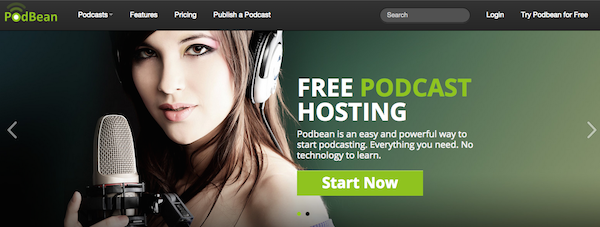
2) PodBean

podbean screenshot

PodBean is another podcast hosting website that will house your MP3 files and distribute them via RSS to the iTunes store. Based on this Reddit thread, there are positives and negatives associated with PodBean, as I’m sure there are also with Libsyn.

Like Libsyn, PodBean has a variety of pricing options for beginner and advanced podcasters. In addition, there is a monthly storage/bandwidth cap that will reset each month. The pricing starts at $5 per month and goes up to $149 per month.

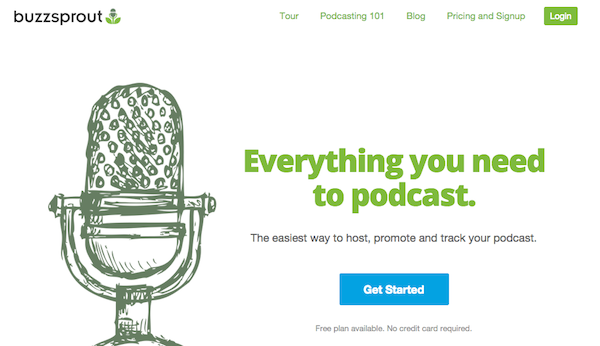
3) BuzzSprout

buzzsprout

When I was searching for a podcast host, I was referred to BuzzSprout from a friend in the same niche as me, who also has a podcast. They have a lot of helpful content for getting started, but also have a bit of a different pricing model than Libsyn or PodBean.

With BuzzSprout, you can host a podcast for free up until 2 hours of upload time per month. Keep in mind, that content will only be hosted for 90 days, and then you will either have to pay them for unlimited hosting with one of their upper tiers or transfer to another hosting provider.

Their paid tiers start at $12 per month and go upwards of $24 per month. I think that most other podcasters like me doing a weekly show would do the $12 or $18 per month option.

Keep in mind that BuzzSprout is newer to the game than other services, and has less add-ons and additional services. However, they have a pretty killer design.

On one Quora forum, a user says:

“The only 2 downsides so far is you can’t replace your files once they are up there (have to re-create the episode which kills your stats) and they don’t have an API for stats which means I can integrate them with my dashboard app.”

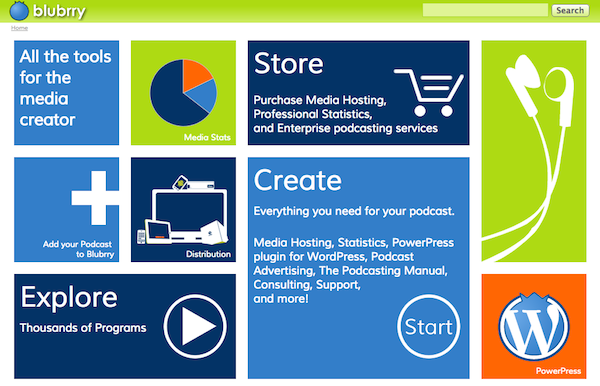
4) Blubrry

Blubrry

Blubrry is another option that you can use to host your podcast. Their pricing starts at $12 per month and goes upwards of $80 per month. Some of the premium tiers include the ability to host a video podcast and extra storage.

Having been started by a fellow podcaster, Bluebrry is another great Libsyn alternative with statistics and affordable pricing. They also have a consulting arm that starts at $100 per hour. Man, that’s some steep pricing, but if you need the help from a trained professional, it might be better than trying to seek someone out on Elance.

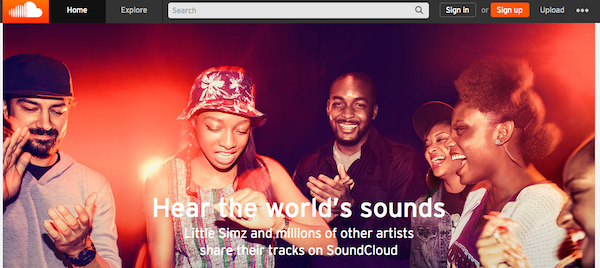
5) SoundCloud

soundcloud

You might have listened to an independent musician on SoundCloud or some cool new song, but you can also host a podcast (or your music compositions) with the service! At the time of writing, the program is still in beta, but you can check it out here.

I’m excited to see when they will officially launch the program and am curious how their general comment system might change the way that listeners interact with podcasts through blog posts.

Which podcast hosting service is best?

Surprise! There is no “best” hosting provider. They all have their positives and negatives. Ultimately, it comes down to choosing the one that you like most and that provides the kind of functionality you are looking for.

However, if you are hosting an accompanying website for your podcast or social media scheduling services, I do think there are better providers than others. Let me know which one you choose for your podcast and be sure to link me to your podcast once it’s up so I can listen!

Read More
1 2 3 4 5 6